
Spiidi login uses a Finland-focused bank-identification route rather than a conventional email-and-password form. Open the official Spiidi website, select LOG IN from the fixed left menu, choose a displayed bank such as OP, Nordea, S-Pankki or Danske Bank, approve identification through the bank and return to the euro casino account. The casino lists customer-support hours from 09:00 to 01:00.
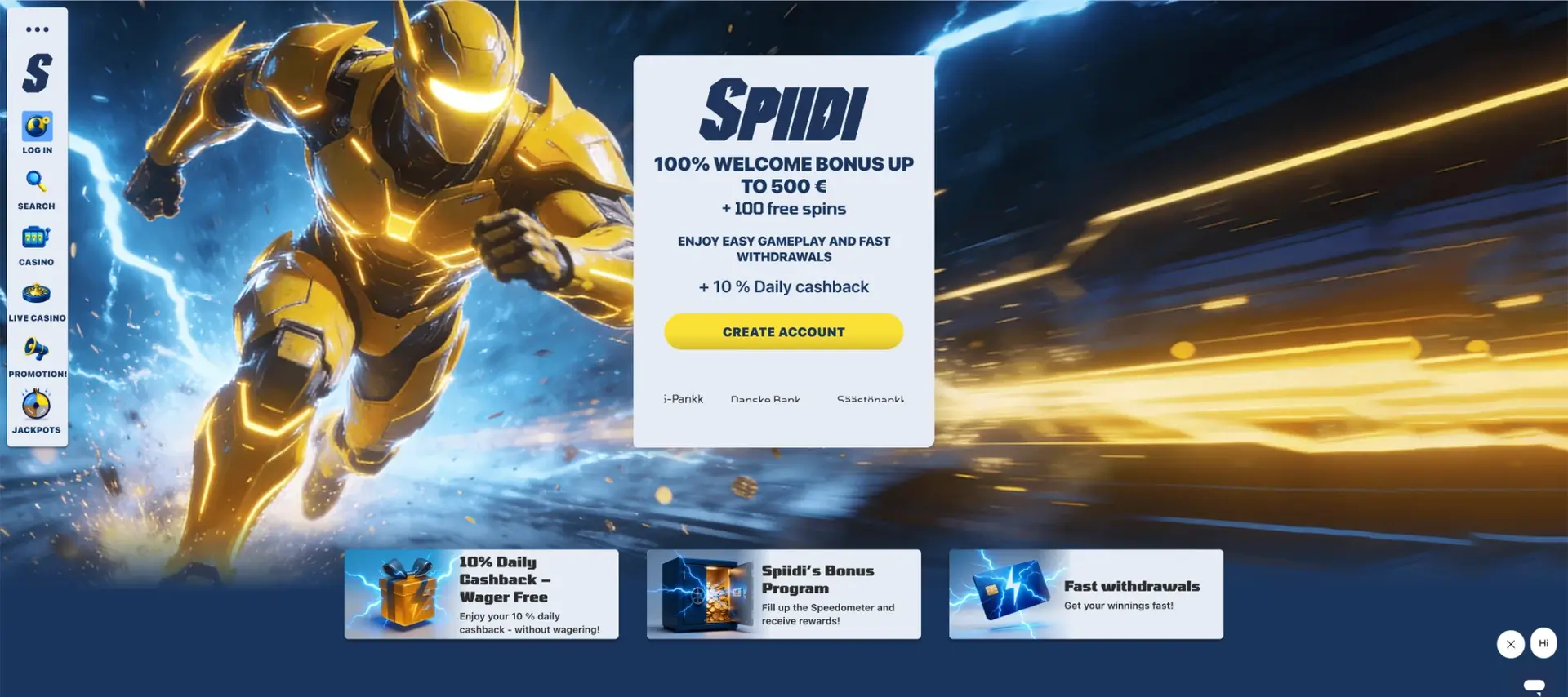
On the official Spiidi website, the login control remains visible across the casino lobby , live section, promotions and jackpot page. This makes account access easy to locate even when a player enters through a game or campaign page.
Spiidi login essentials
The account flow is tied closely to Finnish online banking. The table separates information published on the casino website from details shown only after the bank redirect begins.
| Login item | Details |
|---|---|
| Login control | LOG IN in the fixed left navigation |
| Main method | Finnish bank identification / Pay’n Play |
| Account currency | EUR |
| Password form shown | No conventional casino password form is visible |
| Supported devices | Desktop is shown; mobile browser access should be checked on the device |
| Age requirement | 18+ |
| Finnish support | Daily, 09:00-01:00 |
| Operator | Fruity Entertainment B.V. |
How to log in to Spiidi
The bank-ID route should open from the official site and then transfer the player to the chosen bank’s secure authentication page. Avoid using login links received from unknown messages or advertisements.
- Open the official Spiidi com website in a current browser.
- Select LOG IN from the left-side navigation.
- Choose the bank or payment option connected to your account.
- Check that the redirect belongs to the selected bank.
- Confirm your identity using the bank’s normal approval method.
- Wait for the browser to return to Spiidi without closing the authentication window.
- Check the account name, currency and balance before starting a transaction.
Banks shown for Spiidi account access
The payment-method strip lists a broad set of Finnish banking brands. A logo on the site confirms that the brand is presented as an option, but the exact availability can still depend on account status, technical maintenance or the transaction being attempted.
| Bank or service | Displayed on the site |
|---|---|
| OP | Yes |
| Nordea | Yes |
| S-Pankki | Yes |
| Danske Bank | Yes |
| Säästöpankki | Yes |
| Aktia | Yes |
| Ålandsbanken | Yes |
| OmaSp | Yes |
| POP Pankki | Yes |
| Revolut | Yes |
Login security and identity checks
Bank identification reduces reliance on a reusable casino password, but players still need to protect the device, browser and banking approval method. The site’s legal text names the operator and licence, sets an 18+ limit and explains that bank credentials are used to enter the game account.
- Type the Spiidi address directly or use a trusted bookmark.
- Check the browser address before entering bank credentials.
- Never approve an identification request you did not start.
- Keep the phone and bank-authentication application locked.
- Log out after using a shared computer or public device.
- Contact support if the bank redirect returns to an unfamiliar page.
Bank ID can confirm identity at entry, but it does not guarantee that no further checks will occur. Any document or source-of-funds request should be read inside the official account and verified with casino support.
Creating access when you do not have a Spiidi account
With Pay’n Play, first access and identification can be part of the same bank-based flow. The public Spiidi pages do not present a separate long registration form. A new player should begin from the official login or play control, choose a supported bank and follow the information displayed before approving the connection.
- Open Spiidi com and select the account-access control.
- Choose the correct bank from the available list.
- Read the age, privacy and account information shown before approval.
- Complete bank identification.
- Confirm that an EUR casino account has been created or opened.
- Read the cashier and bonus rules before making the first deposit.
Mobile Spiidi login
Spiidi does not currently publish a native iOS or Android download, so the practical mobile route is the official website in Safari, Chrome or another current browser . The same bank-ID principle applies when the bank and browser support the redirect.
Keep the browser open while switching to a bank application. Returning too early, using private-browsing restrictions or blocking redirects can interrupt the handover between the casino and bank.
Common Spiidi login problems
Most access failures occur before the casino account opens, during the redirect or when the bank approval does not return a completed session. The following checks do not replace support instructions but can isolate common causes.
The bank list does not load
A script blocker, stale browser data or temporary site maintenance can prevent the payment and login panel from appearing.
- Reload the page once without repeatedly submitting the form.
- Allow required scripts and redirects for the official site.
- Clear site data or try another current browser.
- Check whether the same bank is visible later in the cashier.
Bank identification is approved but Spiidi does not open
The return link can fail when the browser tab is closed, the session expires or the device blocks the redirect back to the casino.
- Keep the original Spiidi tab open during bank approval.
- Return through the bank’s completion button rather than switching manually.
- Disable strict pop-up blocking for the session.
- Start a fresh login attempt if the previous session has expired.
The wrong account or currency appears
Do not deposit until the account identity and EUR currency are correct. Log out, repeat the bank identification with the intended credentials and ask support to check duplicated or mismatched account records.
The login control is visible but does not respond
Browser extensions, stored data or a temporary front-end fault can leave the button inactive.
- Refresh the page and wait for all navigation elements to load.
- Try the same page in another browser.
- Turn off content-blocking extensions for the official domain.
- Use the on-site chat launcher if it remains available.
What becomes available after login
The fixed site navigation indicates the main account areas a logged-in player can reach. Exact balance, bonus and verification menus can vary with account status.
- Casino lobby and game search.
- Live casino tables and game-show categories.
- Promotions, cashback and loyalty information.
- The opt-in jackpot page.
- Cashier access for EUR deposits and withdrawals .
- Support through the visible chat launcher.
Frequently asked questions
The answers below cover the most common questions about entering a Spiidi account through Finnish banking.
Where is the Spiidi login button?
It is shown as LOG IN in the fixed left-side navigation on the official Spiidi website.
Do I need a Spiidi password?
The public casino pages do not present a separate password form. The standard route uses Finnish bank identification.
Can I log in with Nordea or OP?
Yes, both Nordea and OP appear in the payment-method row, alongside several other Finnish banks. Live availability should still be checked at the time of access.
Why does the bank page open during login?
The casino uses bank identification to authenticate the player and connect the session to the account.
What should I do when the bank approval is completed but the account does not open?
Keep the original tab open, allow the return redirect and start a fresh session if the earlier attempt expired. Contact support when repeated attempts fail.
What are the Spiidi support hours in Finnish?
The legal notice states that Finnish-language customer service is available every day from 09:00 to 01:00.
Can under-18 users create access?
No. The site states that participation is not permitted for anyone under 18.